
Fast Mode
Fast mode requests a higher-priority capacity tier upstream, which means shorter queuing and faster responses. You can now force it on directly at the API key level, with no client-side changes.
This is especially handy for the Codex desktop app: its interface has no Fast toggle, so previously the only way was a plugin that rewrote requests. Setting the key policy to force it on achieves the same thing, with no plugin required.
Roughly 2x the cost
Fast mode uses the upstream priority pricing tier, so charges are about 2x those of regular mode. Make sure that is what you want before enabling it.
How to Set It
- Open the API keys page.
- Create a new key, or click
Editon an existing one. - Find
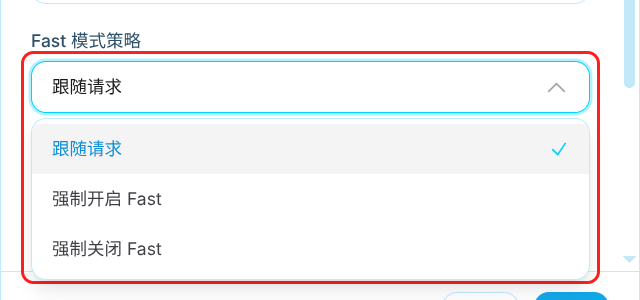
Fast mode policyand pick an option. - Save.
The Three Options
| Option | Behavior |
|---|---|
Follow request (default) | Passes through whatever the client sent, adding and removing nothing |
Force Fast on | Sends requests as Fast whether or not the client asked for it |
Force Fast off | Strips any Fast flag the client included |
Force Fast off removes only the Fast flag. It leaves other priority settings such as flex, auto, default, and scale untouched.
Scope
The setting applies to every request made with that key, not just Codex. Regular chat completions, Responses, and Anthropic-format requests are all covered.
Changes take effect immediately. Even on long-lived WebSocket connections, the new policy is picked up on the next turn - no reconnect or client restart needed.
When Force On Does Not Apply
Force Fast on has prerequisites. When they are not met it is silently skipped: no error, and the request goes out in regular mode.
- The key is not currently routed to an OpenAI or Anthropic account
- The Anthropic account uses Bedrock, Vertex, or OAuth credentials (only API key credentials are supported)
- The current model does not support the priority tier
- A platform administrator has configured a global Fast filter or block policy
Administrator policy wins
The platform-wide Fast policy takes precedence over per-key settings. If an administrator configured filtering or blocking, Force Fast on cannot bypass it.
Related Links
- Create API Key - how keys are created
- Codex Guide - Codex integration setup
- Billing - billing unit and group multipliers