# ZCode
[ZCode](https://zcode.z.ai/) is a desktop AI coding agent that supports custom providers compatible with the OpenAI protocol. This guide connects ZCode to Modelink using `deepseek-v4-flash` as the example model.
## Prerequisites
Before you begin, prepare:
- An installed copy of ZCode.
- A valid Modelink API key.
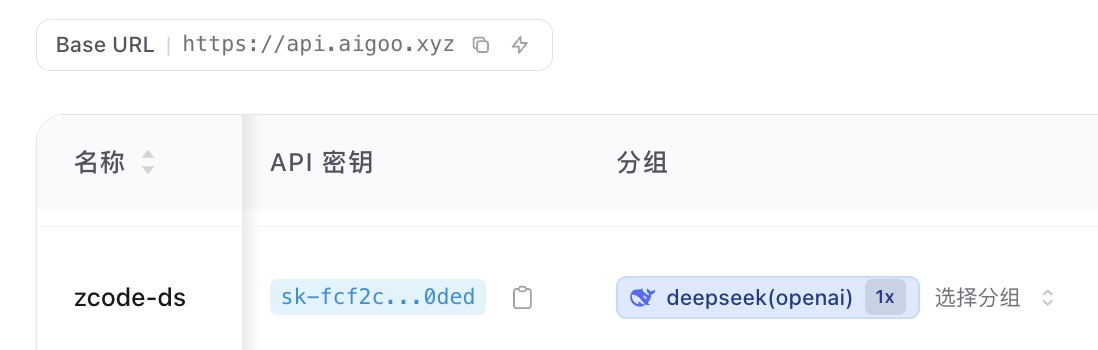
- The `deepseek(openai)` group selected for that key.
::: warning Protect your API key
Never share a complete API key or include it in a public screenshot. If a key is exposed, delete it in the Modelink console and create a new one immediately.
:::
## 1. Create a Modelink API Key
Open the [Modelink API Keys page](https://api.aigoo.xyz/keys), create a key, and select the `deepseek(openai)` group.
Copy the new API key. You will enter it in ZCode in the next step.
## 2. Add a Custom Provider
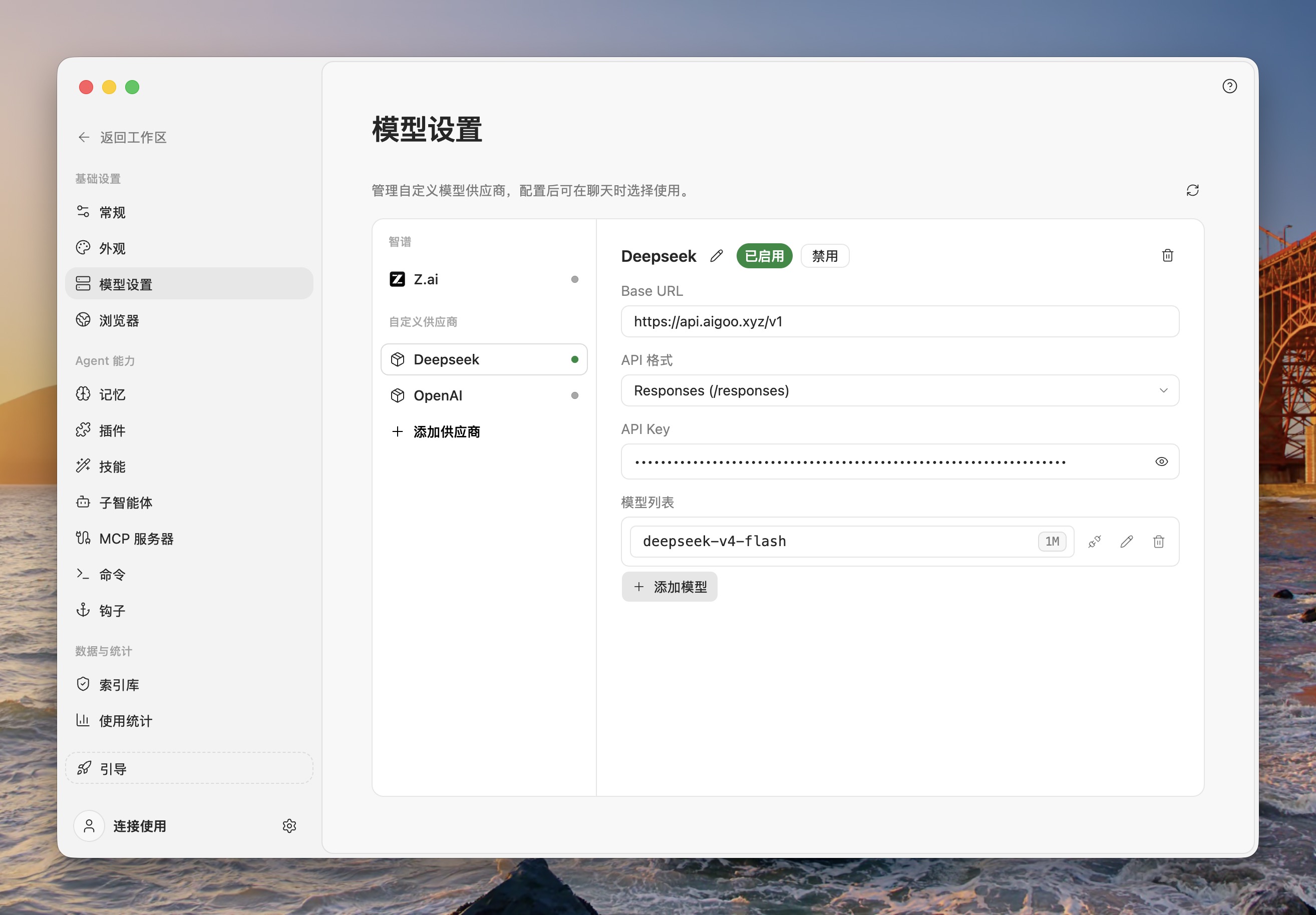
1. Open ZCode and click the settings button in the lower-left corner.
2. Open **Model Settings**.
3. Click **Add Provider** at the bottom of the provider list.
4. Enter the following values:
| Field | Value |
| --- | --- |
| Name | `Modelink DeepSeek` (or another recognizable name) |
| Base URL | `https://api.aigoo.xyz/v1` |
| API format | `Responses (/responses)` |
| API Key | The Modelink API key you just created |
Click **Add Model** in the model list and enter this model ID:
```text
deepseek-v4-flash
```
Make sure the provider is **Enabled**.
## 3. Configure Model Limits
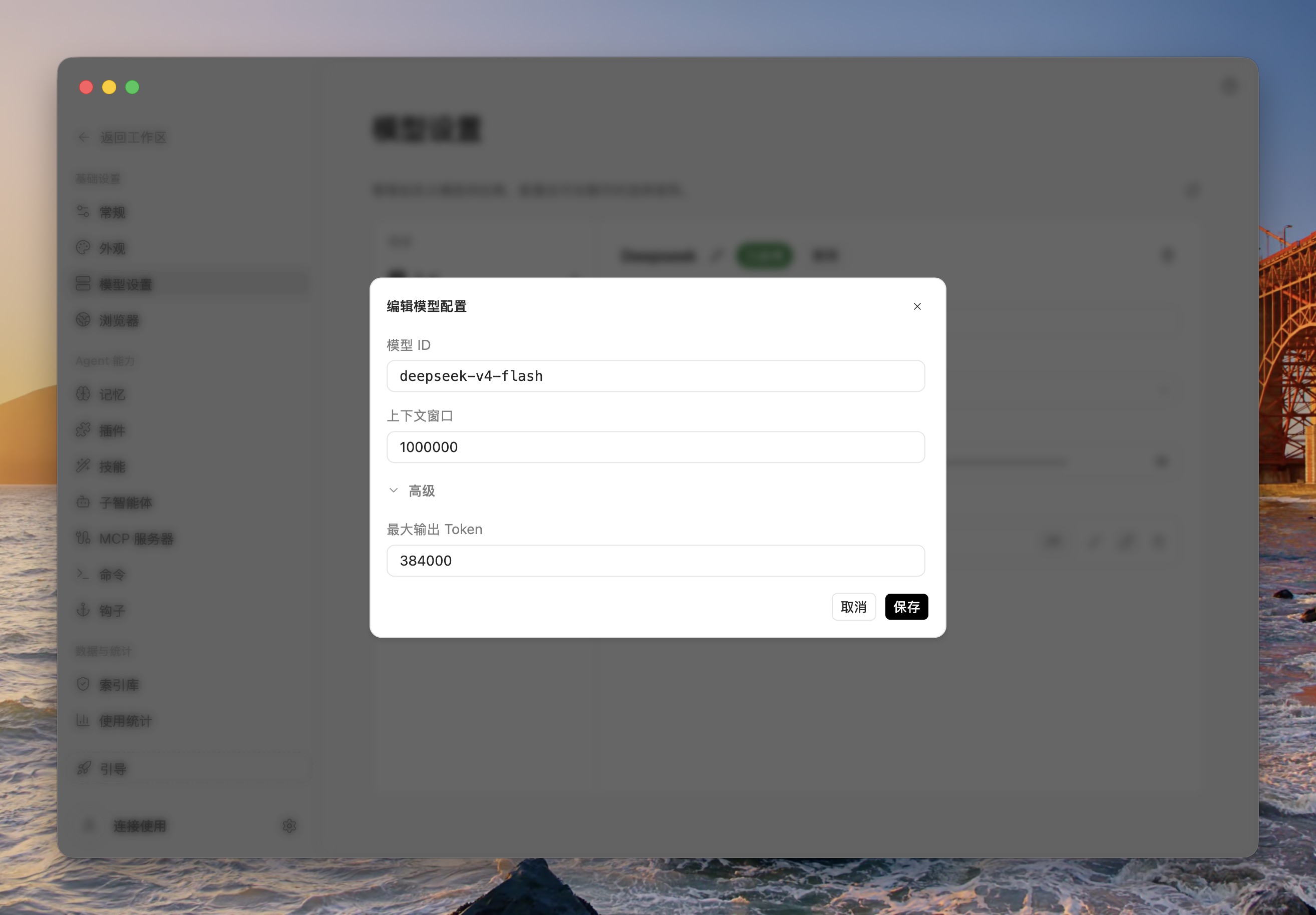
Click the edit button next to `deepseek-v4-flash` and enter the values shown in this example:
| Field | Example value |
| --- | --- |
| Model ID | `deepseek-v4-flash` |
| Context window | `1000000` |
| Maximum output tokens | `384000` |
Click **Save** to finish the model configuration.
::: tip About these limits
These values reproduce the configuration shown in the screenshots. If Modelink changes the model capabilities later, follow the latest model information in the console.
:::
## 4. Verify the Connection
Return to the ZCode workspace, start a new conversation, and select `deepseek-v4-flash` from the model selector. Send a simple instruction. A normal response confirms that the connection works.
If the model does not appear, check that:
- The custom provider is enabled.
- The Base URL is exactly `https://api.aigoo.xyz/v1`.
- The API format is `Responses (/responses)`.
- The model ID is exactly `deepseek-v4-flash`.
- The API key is valid and uses the `deepseek(openai)` group.
For general custom-provider behavior, see the [official ZCode configuration guide](https://zcode.z.ai/cn/docs/configuration#custom-provider-steps).